A data room is ready when reviewers can find what they need without seeing what they do not need
Uploading a request list is not the same as preparing a review environment. External reviewers need a predictable place to find current documents, while the project team needs a controlled way to release sensitive material, answer questions, replace files, and close access when a phase ends.
The setup should answer four questions before launch:
- What is in scope for this review phase?
- Who owns each document area and approves release?
- Which reviewer groups need access to which folders and actions?
- What record will the team retain when the review ends?
This guide is an operational template. The final document scope and disclosure decisions depend on the transaction, jurisdiction, internal policy, and professional advice.
When a shared folder is no longer enough
The choice is conditional. A shared folder may be sufficient for a small internal team exchanging low-sensitivity working files. A virtual data room becomes more relevant when confidential documents must be reviewed by multiple external groups, released in stages, discussed through a managed Q&A process, or closed with a retained record of project activity.
| Review condition | Shared folder may be sufficient | Consider a virtual data room |
|---|---|---|
| Participants | One internal team or a small known group | Multiple external organizations or reviewer groups |
| Disclosure | Most participants can see the same material | Different groups or project phases require different document scope |
| File handling | Ordinary collaboration and local working copies are acceptable | Online review and download need separate decisions |
| Questions and updates | Informal communication is manageable | Questions, answers, revised files, and owners need one project context |
| Closeout | No formal access-removal or activity-review step is required | Access, open questions, final index, and retained records need planned closeout |
A VDR does not remove the need for disclosure judgment, legal review, internal policy, or project ownership. It gives those decisions a more structured operating environment.
See the full VDR definition and file-sharing boundary.
How the checklist changes by diligence scenario
The same folder template should not be copied without judgment. Different transactions change which workstreams need separate access, which documents can be downloaded, and which questions require specialist review.
Representative workflow — not a customer case.
The following examples illustrate buyer decisions. They do not state or imply that any named or unnamed company used bestCoffer.
User and document problem. A corporate-development team may need legal, financial, commercial, and technical reviewers to examine ownership records, IP evidence, supplier and customer contracts, product roadmaps, and selected technical materials. Not every reviewer needs the same technical or commercial detail.
Decision and control points. Separate general diligence from specialist technical review; decide whether sensitive files remain online or may be downloaded; release later-stage material only to the approved group; and keep document changes connected to the questions they affect.
Where bestCoffer helps. Approved VDR capabilities can centralize project files, separate access by team, role, file, and project stage, support online review and dynamic watermarking, and keep comments, Q&A, file updates, and activity records in the project context.
What remains with the organization or POC. The company determines disclosure scope, IP and export-control treatment, document preparation, reviewer authority, and legal conclusions. Exact permission behavior, download controls, event records, and exports must be confirmed against the current version and project configuration.
User and document problem. An energy transaction may bring finance, operations, legal, environmental, insurance, people, and specialist advisers into the same review. Asset schedules, operating materials, permits, contracts, environmental records, and workforce information can have different owners and release conditions.
Decision and control points. Build folders around workstreams rather than one broad asset directory; give specialists the minimum relevant scope; decide when local analysis justifies a download; and track revised schedules, supplemental requests, and unresolved questions through closeout.
Where bestCoffer helps. Team-, role-, file-, and stage-based access supports separate reviewer groups. Online review, watermarking, Q&A, file-change publishing, search, and activity audit trails can support administration while the room is active.
What remains with the organization or POC. The project team decides which technical, environmental, regulatory, or personal information may be disclosed and when. Specialist conclusions, retention rules, precise audit fields, report exports, and configuration details remain organizational or POC responsibilities.
User and document problem. A software or AI company may need to share corporate records, IP ownership evidence, product and architecture materials, security reviews, customer and supplier contracts, and data-governance documentation. Technical reviewers, commercial reviewers, and counsel often need different subsets.
Decision and control points. Decide which technical artifacts belong in the data room, which should remain in a specialist environment, whether online review is enough, and how revised product or security materials will be identified. Do not assume that source code, model artifacts, repositories, or live systems belong in the room.
Where bestCoffer helps. The VDR can centralize approved files, separate reviewer groups, support online review, connect questions to project documents, publish updates, and preserve activity context for administration and closeout.
What remains with the organization or POC. The company owns technical disclosure, code and model access, security conclusions, data-governance decisions, and reviewer authorization. Repository integration, supported formats, deployment, automated ingestion, and exact logging behavior are not implied by this scenario and require separate confirmation.
User and document problem. A cross-border review may involve corporate, finance, tax, legal, and regulatory documents held by teams and advisers in more than one jurisdiction. The challenge is not only document volume; it is keeping reviewer scope, current versions, questions, and closeout responsibilities clear across organizations.
Decision and control points. Map reviewer groups before invitations, separate internal preparation from external disclosure, release restricted documents by stage, decide whether multilingual review requires prepared versions, and identify which activity records the project intends to retain.
Where bestCoffer helps. Multi-data-room and multi-project management, access by team, role, file, and stage, online review, comments and Q&A, file updates, search, and reporting can support the document-review workflow within the current product and project scope.
What remains with the organization or POC. The parties remain responsible for applicable law, cross-border transfer analysis, disclosure obligations, translation review, retention, and professional advice. Data region, deployment, translation scope, integrations, service levels, and commercial terms must be confirmed for the project.
Before building folders, make five decisions
- 1. Confirm the review scope. Start with the actual request list and the current phase of diligence. Mark items as available, pending, not applicable, or restricted. Do not use empty placeholder files to hide missing material.
- 2. Assign an owner to every top-level area. Legal, finance, tax, people, commercial, technology, and other workstreams should each have someone responsible for accuracy, version status, and release approval.
- 3. Separate preparation from disclosure. Keep working files and unapproved drafts in an internal preparation area. Move or publish only reviewed versions into folders visible to external groups.
- 4. Define reviewer groups before inviting individuals. Build groups around organization, responsibility, and review stage. This makes later changes easier to review than a collection of one-off personal permissions.
- 5. Agree on operating rules. Decide how questions are assigned, how revised files are announced, when downloads are allowed, how access is reviewed, and what happens when the project pauses or closes.
Reusable due diligence folder template
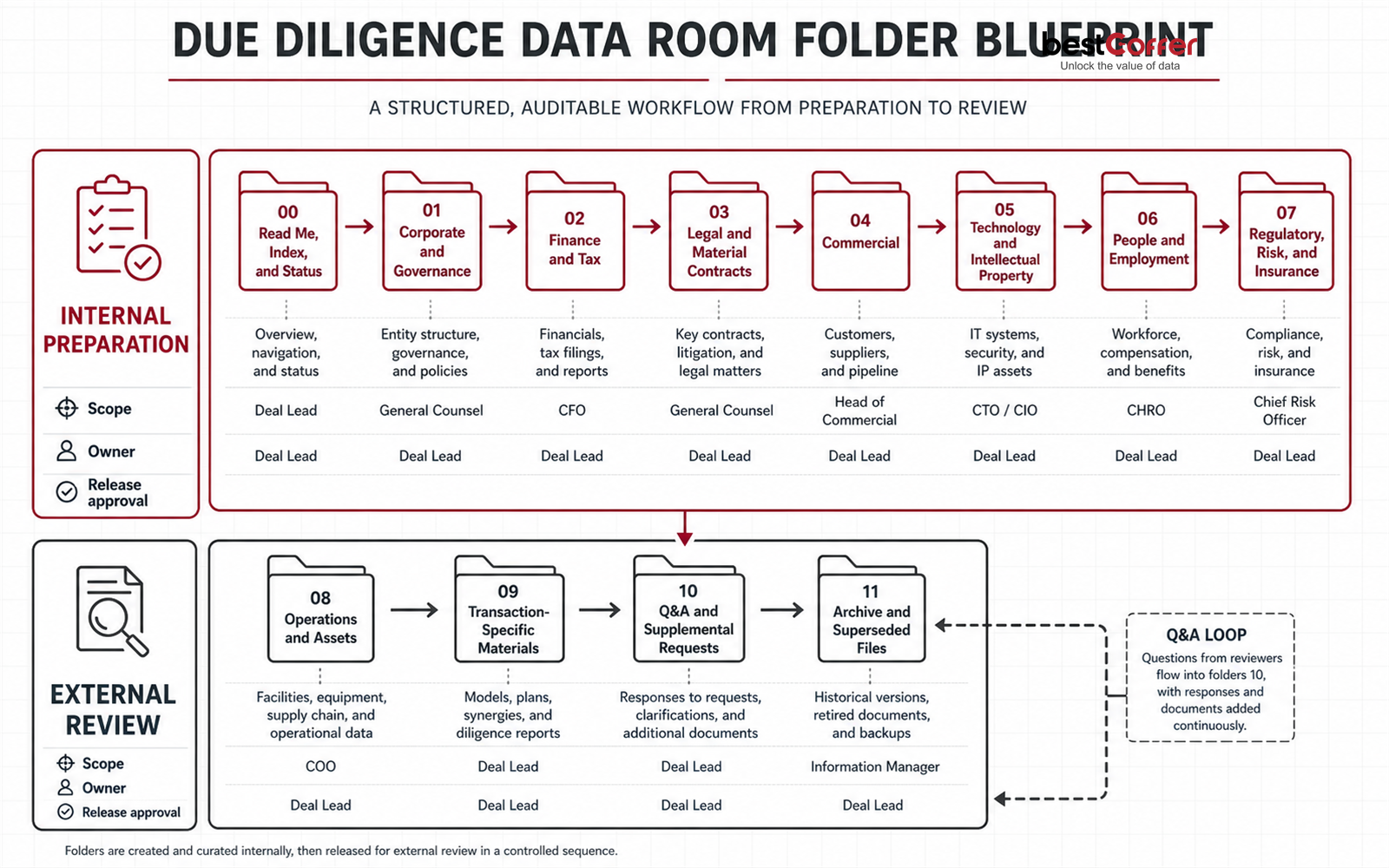
The following structure is a starting point, not a universal disclosure list. Remove sections that do not apply, add transaction-specific subfolders, and have the relevant owners approve the final scope.
| No. | Folder | Typical contents | Release note |
|---|---|---|---|
| 00 | Read Me, Index, and Status | Room instructions, request list, folder index, document status, key contacts | Keep the index current and identify restricted areas |
| 01 | Corporate and Governance | Formation records, ownership, board and shareholder materials, group structure | Confirm current and historical records are clearly separated |
| 02 | Finance and Tax | Financial statements, management accounts, budgets, debt, tax materials | Label reporting period, status, and version |
| 03 | Legal and Material Contracts | Material agreements, disputes, licenses, legal correspondence | Restrict privileged or highly sensitive material as appropriate |
| 04 | Commercial | Customer and supplier information, pipeline, pricing, channel records | Consider narrower access or prepared versions for sensitive details |
| 05 | Technology and Intellectual Property | Product, systems, IP ownership, development and operational materials | Separate technical review from general commercial review where needed |
| 06 | People and Employment | Organization, employment terms, benefits, equity, key-person materials | Review personal information before external access |
| 07 | Regulatory, Risk, and Insurance | Regulatory correspondence, policies, risk records, insurance | Scope depends on sector and transaction context |
| 08 | Operations and Assets | Sites, assets, procurement, business continuity, operating records | Identify the responsible business owner |
| 09 | Transaction-Specific Materials | Structure papers, disclosure materials, financing or closing workstreams | Limit access to the relevant transaction group |
| 10 | Q&A and Supplemental Requests | Question log, approved responses, requested additions | Link each response to the current document or folder |
| 11 | Archive and Superseded Files | Replaced documents and update notes | Keep out of the active review path unless access is required |
Folder and file rules
- Keep top-level numbering stable. Add subfolders instead of repeatedly reorganizing the whole room.
- Maintain one authoritative location for each document. Use an index reference if another workstream needs to find it.
- Use a naming pattern that exposes subject, period, status, version, and date without opening the file.
- Record missing items in the status list rather than uploading blank or vaguely named placeholders.
- When a file is replaced, state what changed and which version is current.
- Put highly sensitive material in a restricted area and release it only when the project reaches the relevant stage.
Permission matrix: design the governance first, then map it to the product
This matrix is a planning template. “Conditional” means the project owner must decide based on document sensitivity, reviewer purpose, and project stage. It does not describe a fixed bestCoffer package or configuration.
| Role | Visible scope | Upload or update | Online review | Download | Q&A | Manage users and access | Activity records |
|---|---|---|---|---|---|---|---|
| Project administrator | Project-wide | Allowed | Allowed | Per internal rule | Manage | Allowed | Review; export scope to be confirmed |
| Internal core team | Authorized project areas | Allowed | Allowed | By responsibility | Ask, assign, and respond | Authorized members only | View relevant activity |
| Workstream owner | Own workstream and assigned folders | Own area | Allowed | Conditional | Respond to assigned questions | Not allowed | View workstream status where configured |
| External legal or financial adviser | Assigned review folders | Only in designated response area, if enabled | Allowed | Conditional | Ask and respond | Not allowed | No administrative activity access |
| Buyer or investor review group | Folders released for the current stage | Normally not allowed | Allowed | Conditional | Ask | Not allowed | No administrative activity access |
| Specialist adviser | Minimum scope needed for the specialist task | Normally not allowed | Allowed | Conditional | Specialist questions only | Not allowed | No administrative activity access |
| Observer | Explicit read-only scope | Not allowed | Allowed | Normally not allowed | Only if required | Not allowed | No administrative activity access |
Use groups wherever possible, start with the minimum scope needed, and review exceptions separately. Permission names, inheritance, available actions, and report fields must be confirmed against the current product version and project configuration.
Where bestCoffer supports the operating model
The checklist describes governance decisions that belong to the project team. bestCoffer VDR provides a document-review environment in which those decisions can be configured and operated. Product behavior still depends on the current version and project configuration.
| Buyer need | Approved bestCoffer capability | Practical value in this checklist | Boundary to confirm |
|---|---|---|---|
| Keep deal files organized across workstreams | Centralized project files; multi-data-room and multi-project management | Gives the folder index, active review areas, and archive a shared project context | Project structure, limits, and commercial scope |
| Separate reviewers by responsibility and phase | Access configured by team, role, file, and project stage | Maps the seven-role planning matrix to a controlled review setup | Exact permission names, inheritance, exceptions, and available actions |
| Review sensitive documents without automatically creating local copies | Online review, dynamic watermarking, and file access controls | Supports the separate view-versus-download decision | Exact download, print, watermark, and supported revocation behavior |
| Keep review discussion attached to the work | Document annotations, comments, and Q&A | Connects questions and responses to the relevant project material | Roles, approvals, notifications, attachments, and exports |
| Manage revised documents during a live review | File-change publishing | Helps reviewers identify the current version and understand updates | Version behavior and update notifications |
| Review project activity and prepare closeout | Activity audit trails, full-text search, and reporting/export capability | Supports access review, unresolved-item follow-up, and retained project records | Exact events, fields, retention, export format, and evidentiary use |
| Ask questions within an authorized document scope | Permission-scoped file Q&A, where enabled for the project | Helps authorized users locate information without implying access beyond their permissions | Availability, model behavior, source display, review controls, and project configuration |
Evaluate the operating model with representative material, not with a feature list alone. Bring one realistic folder tree, several reviewer groups, sensitive sample documents, a restricted folder, a download exception, a revised file, and a short Q&A sequence. Confirm the exact permissions, online-review behavior, update path, activity events, exports, service scope, and commercial terms in writing.
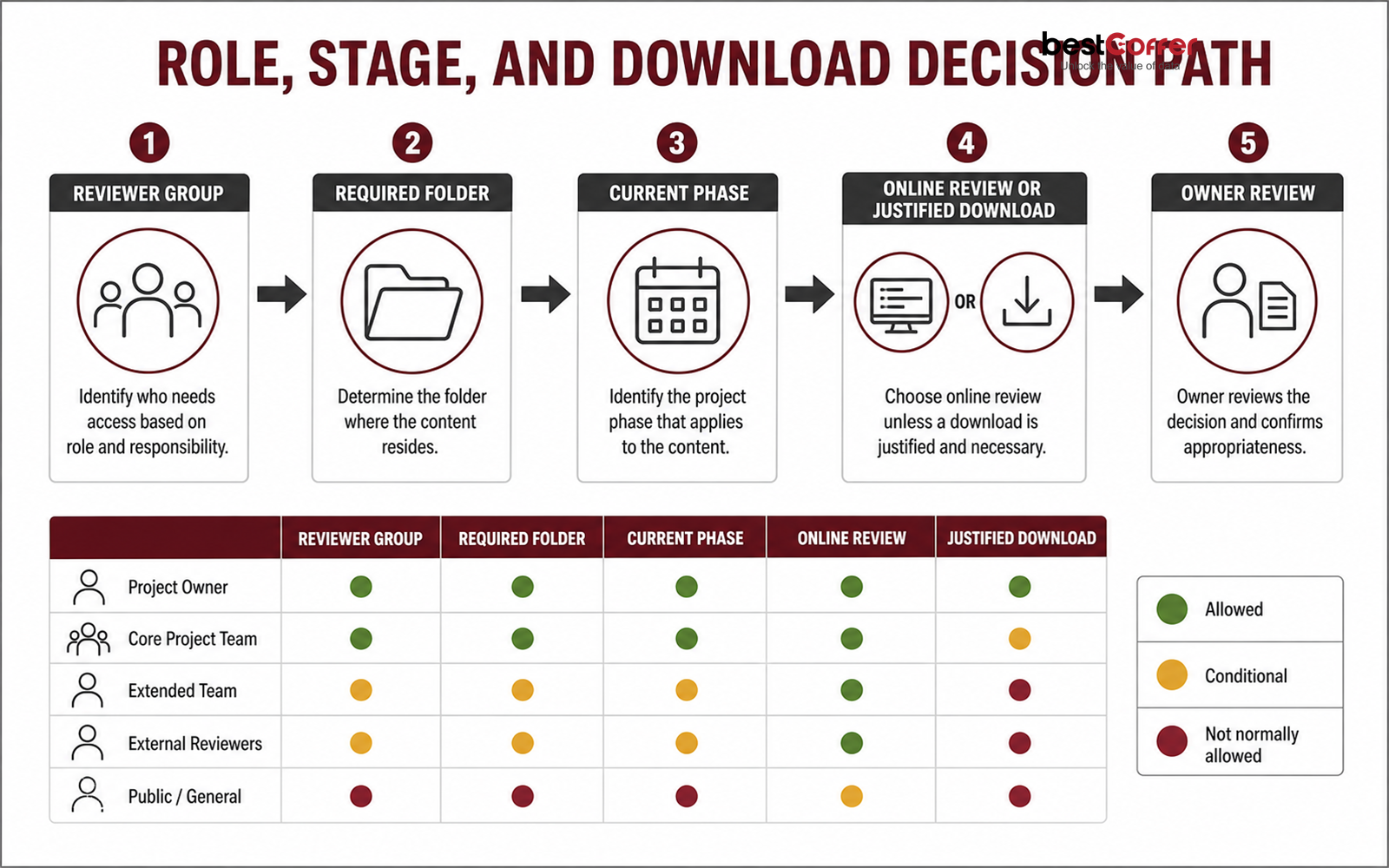
Treat downloads as a separate release decision
Online review and download serve different needs. Once a file is downloaded, the data room no longer provides the full context around how that copy is stored, forwarded, or deleted. A blanket ban may prevent legitimate work, while blanket permission creates avoidable copies.
- Does the task require local analysis, specialist software, or a formal retained copy?
- Who will hold the downloaded file, who may receive it, and when should it be deleted or archived?
- Can the team provide a narrower version or a copy with unnecessary sensitive details removed?
For highly sensitive material, online review can be the starting point. Watermarks and access controls can reinforce handling expectations and support follow-up, but they should not be described as preventing every screenshot, photograph, or onward disclosure.
Keep Q&A tied to the document and version under review
Email makes it easy for questions, attachments, and answers to split across inboxes. A defined Q&A process keeps the review record easier to follow.
- Give each question an owner and a response status.
- Link the question to the relevant folder, document, and version.
- Review responses before they are released to external groups.
- Use one approved answer where several groups raise the same point, subject to access boundaries.
- Track open, answered, and withdrawn questions through closeout.
- Treat a new attachment or revised document as a controlled update, not as an informal email enclosure.
The exact Q&A roles, notifications, approval steps, and export options must be confirmed for the selected product configuration.
Decide what activity evidence the project needs
An activity record is useful only if the team knows what it plans to review and retain. Before launch, identify the events that matter to the project, such as membership changes, permission changes, document publication or replacement, important views or downloads, Q&A actions, and closeout activity.
Set a review owner and cadence. At closeout, decide which records should be retained under internal policy. Exact event names, fields, retention periods, export formats, and evidentiary use are product- and project-specific.
Operate the room through six stages
- 1. Internal preparation. Upload and check naming, period, version, sensitivity, and ownership before files enter an external review area.
- 2. Staged release. Open the folders needed for the current diligence phase. Hold back restricted material until there is a defined reason and approved audience.
- 3. Managed Q&A. Assign questions to the right workstream owner and review responses against the current file before release.
- 4. Controlled updates. Explain why a file changed, identify the current version, and preserve the relationship to any superseded version.
- 5. Access and activity review. Check new members, role changes, sensitive views or downloads, and outstanding questions while the room is active.
- 6. Closeout. Resolve or record open questions, remove access that is no longer required, retain the approved final index and records, and handle working files according to internal policy.
Launch checklist
Documents
- The review scope and request list are agreed.
- Every top-level folder has an internal owner.
- File names, periods, status, and versions are clear.
- Missing items are visible in the status list.
- Sensitive documents have been reviewed before external release.
- The external area contains only approved versions.
Access
- Internal preparation and external review areas are separated.
- External users are grouped by organization, role, and phase.
- Each group can access only the folders needed for its current task.
- Every download exception has a reason and an owner.
- Representative test users have checked the actual experience.
- The team knows how access will be reviewed and removed.
Collaboration and records
- Q&A ownership, response review, and escalation are defined.
- File replacement and update notices follow one rule.
- The team has identified which activity it will review.
- Closeout records and retention owners are agreed.
- Product-specific permissions, logs, reports, and exports have been verified in evaluation or POC.
bestCoffer content is not legal, regulatory, or compliance advice. Requirements depend on the transaction, jurisdiction, product version, project configuration, internal policy, and customer-specific workflow.
Method and sources
This checklist, folder structure, seven-role matrix, and six-stage operating sequence are bestCoffer’s recommended implementation method. They are not quoted standards, a universal disclosure list, or a substitute for legal, tax, financial, regulatory, or technical review. Product statements were checked against bestCoffer’s current approved product knowledge; items that vary by version or project remain marked for confirmation.
- NIST SP 800-53 Rev. 5, current updated publication page. https://csrc.nist.gov/pubs/sp/800/53/r5/upd1/final
Use: general support for access-control, audit-and-accountability, authorization, monitoring, and risk-management principles. Do not imply that NIST prescribes this VDR structure or that bestCoffer is certified against the publication. - UK Information Commissioner’s Office, Data sharing covered by the code. https://ico.org.uk/for-organisations/uk-gdpr-guidance-and-resources/data-sharing/data-sharing-a-code-of-practice/data-sharing-covered-by-the-code/
Use: general support for treating third-party access to personal data as a governed sharing decision; the code includes M&A due-diligence guidance. The page states that the guidance is under review, so it must not be used as a current legal conclusion for every jurisdiction.
These sources inform the control principles behind the checklist. They do not validate bestCoffer product claims, prescribe a transaction’s disclosure scope, or establish compliance.
Frequently asked questions
A due diligence data room usually includes a room index, process instructions, and the corporate, financial, tax, legal, commercial, people, technology, risk, and transaction-specific documents relevant to the review. The final scope should follow the actual request list and approved disclosure plan.
Use stable numbered folders that follow the review workstreams, assign an owner to each top-level area, separate internal preparation from external review, and keep superseded files outside the active path. Adapt the structure to the transaction instead of treating any template as a universal disclosure list.
Not automatically. Start from the task, document sensitivity, recipient, and review stage. Online review may suit highly sensitive files, while download can be enabled when local analysis, specialist software, or a formal retained copy is genuinely required.
Groups are usually easier to govern. Create groups by organization, responsibility, and project phase, then add individuals to the appropriate group. Review special document exceptions separately and confirm the product's actual permission behavior before launch.
Give each question an owner and status, connect it to the current document or folder, review the response before external release, and track unresolved items through closeout. Keep attachments and revised files inside the same controlled update process.
Resolve or record open questions, remove access that is no longer required, confirm the final document index, retain approved activity records, and handle working files under the organization's retention policy. A paused project should also trigger an access review.
Related resources
Start with the definition, use cases, and file-sharing boundary.
Read the guideDue Diligence Data Room Workflow
Review the lifecycle from preparation to closeout.
Read the workflowbestCoffer Virtual Data Room
Explore the product context for document collaboration.
Explore the productTalk through a data room workflow
Bring your folder tree, reviewer groups, and open questions.
Contact bestCoffer
A practical next step
Test the setup with a real diligence workflow
Bring a representative folder tree, reviewer groups, sample documents, and one download or Q&A exception. Use them to check whether the room's access, review, update, and activity controls match the way your team will actually run diligence.